

I’d consider ANR for steady engine drone, or passive for battery-free noise reduction - but I’d test both in your aircraft before buying. Clear radio calls, audible warnings and a comfortable seal matter more than how quiet a headset sounds at first.
My comparison comes down to noise reduction, speech clarity, comfort, power, upkeep and cost. Both types need a good seal, including when you wear glasses.
Quick Comparison
| What I’d compare | Passive | ANR |
|---|---|---|
| Noise reduction | Generally stronger at higher frequencies | Adds cancellation of low-frequency drone |
| Speech and warnings | Check clarity and warning audibility | Less drone may help speech; still check warnings |
| Comfort | Check seal, pressure and fit with glasses | Same checks; less drone may ease listening effort |
| Power | None needed for attenuation | Batteries or aircraft power; passive isolation remains if power fails |
| Upkeep | Seals, cables and connectors | Same checks, plus batteries and electronics |
| Cost | Usually lower upfront | Usually higher upfront, plus power costs |
| Aircraft fit | Confirm plugs and audio compatibility | Confirm plugs, audio compatibility and power supply |
<u>Before buying, I’d check attenuation data, spare-seal costs and aircraft compatibility</u> - including what communication remains available if ANR power fails. For custom in-ear options, I’d also check professional fitting, cable routing and how my own voice sounds.
How Passive Attenuation and ANR Work
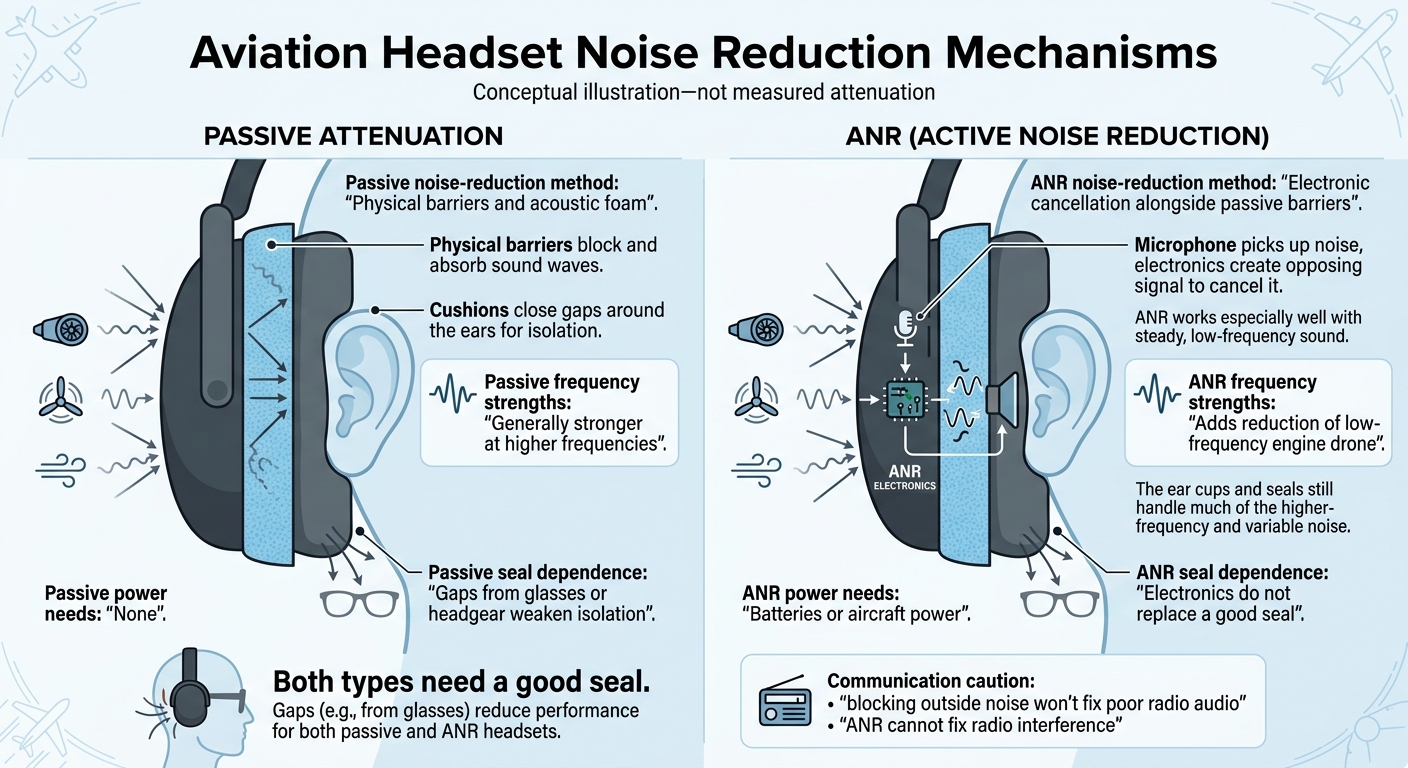
Passive vs ANR Aviation Headsets: How Noise Reduction Works
Headset performance depends on design, fit and cockpit noise. Compare the types of noise each system reduces, rather than how quiet it seems at first. In the cockpit, speech clarity and fatigue both shape headset choice.
| Feature | Passive attenuation | ANR |
|---|---|---|
| Noise-reduction method | Physical barriers and acoustic foam | Electronic cancellation alongside passive barriers |
| Frequency strengths | Generally stronger at higher frequencies | Adds reduction of low-frequency engine drone |
| Seal dependence | Gaps from glasses or headgear weaken isolation | Electronics do not replace a good seal |
| Power needs | None | Batteries or aircraft power |
Passive Attenuation: Ear Cups and Seals
Ear cups block outside sound, acoustic foam absorbs it, and cushions close gaps around the ears. Together, these parts generally reduce higher-frequency noise more effectively than low-frequency engine drone. But blocking outside noise won’t fix poor radio audio.
ANR: Reducing Low-Frequency Noise
Microphones pick up noise, then the headset’s speakers produce an opposing signal to reduce it at the ear. ANR works especially well with steady, low-frequency sound. The ear cups and seals still handle much of the higher-frequency and variable noise.
Reducing persistent drone makes speech easier to follow. However, ANR cannot fix radio interference, and its added electronics can fail. That distinction matters when you’re listening for radio calls, intercom audio and warning tones.
sbb-itb-80b2a19
Cockpit Noise, Speech and Comfort
Once the drone is reduced, check speech clarity and comfort.
| Cockpit factor | Passive headsets | ANR headsets |
|---|---|---|
| Radio speech | Can be clear with a good seal. | Lower background noise can make speech clearer at lower listening levels. |
| Sudden sounds | Physical barriers reduce noise immediately. | Cancellation works best with constant noise, rather than sudden peaks. |
| Long-flight fatigue | Comfort depends on remaining noise and clamping pressure. | Less drone can reduce listening effort, but pressure points can still cause discomfort. |
| Glasses | Glasses arms can break the seal and reduce speech clarity. | Glasses arms can weaken passive isolation and affect cancellation. |
These are fit and comfort differences, not protection ratings.
Hearing Radio Calls, Intercom Audio and Warnings
Aim for clear speech at normal listening levels. During the ground check, make sure you can understand radio calls and intercom speech, and hear warning tones, at those levels. Avoid settings that mask warnings or changes in engine sound.
Glasses, Ear Seals and Long-Flight Comfort
Test the headset with your usual glasses or sunglasses. Glasses arms and worn ear seals can break the acoustic seal, letting noise in and making speech harder to understand.
Check clamping pressure and pressure points - not just how quiet the headset feels at first. High clamping pressure commonly causes discomfort on long flights. Heat and sweat around the cushions matter too. Check fit and comfort before looking at battery life and upkeep.
Power, Maintenance and Costs
After speech and comfort, weigh upkeep against purchase price. Both headset types need seal and cable care. ANR also needs battery replacement or charging, plus electronic servicing.
| Ownership factor | Passive headsets | ANR headsets |
|---|---|---|
| Power source | No power needed for attenuation. | Batteries or compatible aircraft power run cancellation. |
| Pre-flight checks | Check seals for wax or debris, and inspect cables and connectors for damage or loose connections. | Make the same physical checks, then check battery levels and ANR function. |
| Wear points | Seals, cables and connectors. | Seals, microphones and speakers. |
| Failure effects | Compressed or cracked seals reduce attenuation. Cable faults can affect communication. | Power loss stops cancellation, leaving passive noise isolation. |
| Running costs | Replacement seals, cables and servicing. | The same costs, plus battery replacement or charging and electronic servicing when faults appear. |
Passive Headset Checks and Seal Care
Before flight, inspect seals for wear or damage and check cables and connectors for loose connections. Replace compressed or cracked seals rather than waiting for a noticeable drop in noise isolation.
Follow the manufacturer’s cleaning instructions. Use only approved methods on acoustic materials and microphones, taking care not to damage electrical parts.
Once the seals and cables are in good condition, check how the headset fits your aircraft setup.
ANR Power Needs and Power Loss
ANR battery life depends on battery type, temperature and use. Before flight, check battery levels, microphone operation and circuit function.
If power is lost, active cancellation stops, and the headset falls back to passive noise isolation. Check what happens during power loss, including whether radio, intercom and warning audio remain available.
Next, check the headset’s fit and compatibility with your aircraft.
Checking Fit and Aircraft Compatibility
Once you’ve checked noise control, power and maintenance, make sure the headset suits your aircraft and your head. Give the supplier your aircraft and intercom model, then confirm the connector type, impedance, mono/stereo wiring and power source. Custom-fit systems also need checks for seal, routing and warning audibility.
Try the headset with your usual glasses and headwear. Turn your head and talk to check for pressure points or changes in noise isolation. During a ground check in the aircraft you’ll use, test radio calls, intercom speech and warnings.
Ask for frequency-by-frequency attenuation data, rather than a single headline figure. Compare those results with your aircraft’s engine and wind noise. For custom hearing protection, check AS/NZS 1270:2002 where relevant.
Custom-Fit Hearing Protection and Communication
Before using custom in-ear components, check aircraft compatibility, attenuation data and audibility. Arrange professional deep ear impressions and ask about cable routing, connector options and the occlusion effect - when your own voice sounds hollow. Vented filters can help, but you still need to check audibility in the intended installation.
Conclusion: Choosing for Your Aircraft and Flights
Once you’ve checked fit, speech clarity and power needs, neither type is best for every pilot.
| Your priority | Passive | ANR |
|---|---|---|
| Noise profile | Generally stronger at higher frequencies | Adds reduction of steady, low-frequency engine drone |
| Long flights | Suitable if the seal stays comfortable | Worth considering when drone causes fatigue |
| Budget | Usually lower upfront cost | Higher upfront cost |
| Power and upkeep | Battery-free attenuation and simpler maintenance | Needs batteries or aircraft power, plus electronic servicing |
Before flying with ANR, confirm what passive protection remains if power fails. Compare verified attenuation, reliable communication and fit, rather than relying on the label.
FAQs
How can I tell if cockpit noise is damaging my hearing?
Cockpit noise often exceeds the generally safe exposure threshold of 85 dB(A). Use formal noise assessments - not how loud it sounds - to judge exposure. A safe exposure calculator can help you check exposure time both with and without hearing protection.
ACS Custom offers bespoke hearing protection and in-ear monitors with advanced acoustic filters. These filters reduce harmful noise peaks while keeping communication clear and maintaining situational awareness.
How should I compare headset attenuation data?
Compare decibel (dB) reductions across frequency ranges to check that the protection meets your safety needs without muffling too much sound. Look for AS/NZS 1270 certification to check compliance with Australian performance and safety requirements.
Passive isolation relies on the physical seal. Custom-moulded options provide more reliable, consistent protection, typically 26–28 dB. Universal or foam alternatives often produce variable results.
Can I safely combine earplugs with an aviation headset?
Yes, custom-moulded earplugs can safely be worn under an aviation headset for extra noise reduction, particularly in noisy settings such as aircraft hangars or cockpits.
High-quality custom earplugs fit snugly and usually sit comfortably beneath the headset without sticking out or causing irritation. Together, the earplugs and headset help manage noise levels while keeping communication clear.


