

I’d choose custom IEMs for clear cues at lower monitoring levels - not louder bass. ACS Classic IEMs offer about 30 dB of passive isolation, but <u>isolation does not make high volume safe</u>.
For DJs, producers and live electronic performers, I’d check five things before buying:
- Low end: Can you hear kick and bass separately at a moderate volume?
- Isolation: Does the seal block enough stage noise without losing needed talkback?
- Fit: Do the moulds stay comfortable and sealed as you move through a full rehearsal?
- Care: Can you keep the sound outlets clear, dry the shells and check the cables after gigs?
- Connections: Does your rig have a suitable headphone output, the right adaptor and correct stereo routing?
My starting point: professional ear impressions, model-specific specs and a test on your own rig. Then rehearse at a conservative level before your first gig.
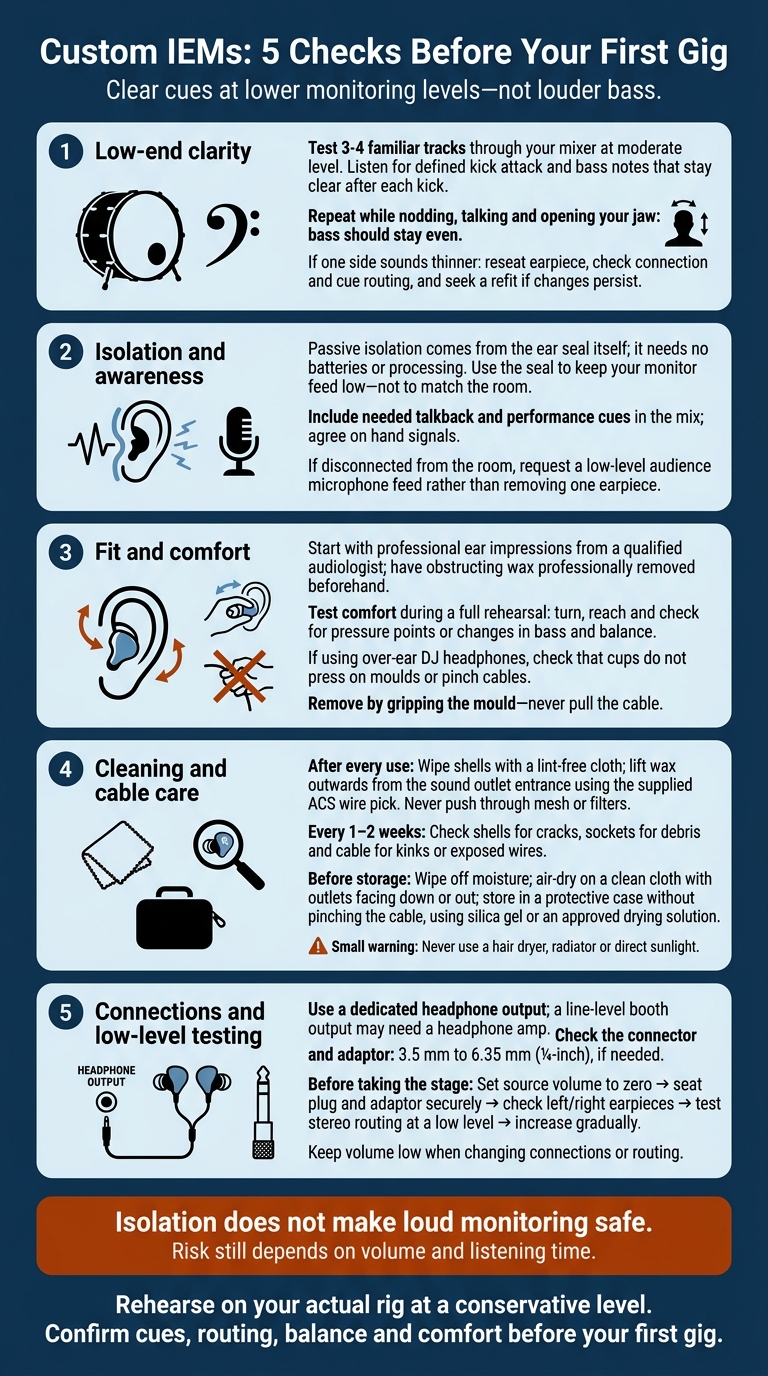
Custom IEMs: 5 Checks Before Your First Gig
How Custom IEMs Work
That clearer low end comes from the shell, seal and drivers working together. Custom IEMs play your monitor mix through internal drivers. Filtered earplugs only reduce sound. Universal-fit earphones also play audio, but use standard tips instead of custom shells.
An audiologist takes professional ear impressions so the finished monitors closely match your ear canals and seal securely. The impressions need enough depth to support bass response and keep the monitors in place. Have your ears checked for wax before your appointment: a blockage can stop the audiologist from taking accurate impressions.
Your DJ mixer, sampler or live rig sends the cue/monitor signal through a headphone output or wireless belt pack to the IEM drivers. This lets you hear cue points and mix detail on stage. Use a 3.5 mm to 6.35 mm (¼-inch) adaptor if needed. Most headphone outputs can drive custom IEMs directly, though some rigs need a dedicated headphone amp.
Isolation does not make loud monitoring safe. Risk still depends on volume and listening time. Use the isolation to keep monitoring levels down during your set - not to match the room.
sbb-itb-80b2a19
1. Clear Low End: Check ACS Custom IEMs
Judge ACS Custom’s custom IEMs by low-end clarity, fit and cable layout, not brand claims alone. Check the exact model’s fit and cable exit, especially if you move a lot on stage.
Once the shell fits properly, test the low end in a real mix. Judge bass by separation, not heft. Play three or four familiar tracks through your own mixer or monitor rig at a moderate level. Listen for a defined kick attack, bass notes that stay clear after each kick, and sub-bass that doesn’t blur percussion or cue details. Sharp hats, claps and sampler hits should have a distinct start and decay.
Repeat the test at the same moderate level while nodding, talking and opening your jaw. The bass should stay even as you move. If one side sounds thinner, reseat the earpiece, then check the connection and cue routing. A poor seal reduces bass and makes cues less reliable. If the changes persist, you’ll need a refit.
Ask ACS for the isolation figure for the exact IEM model: earplug attenuation ratings don’t carry over to monitors. If the bass holds together, check how much outside noise the monitors block.
2. Passive Isolation in Loud Venues
With the low end sorted, the next test is how much venue noise the seal blocks. Passive isolation comes from the ear seal itself, much like the difference between custom earplugs vs. foam earplugs. It needs no batteries or processing. This matters most in clubs and at festivals, where crowd noise and PA spill can mask cues.
A good seal reduces outside noise competing with your feed, making the monitor mix and its cues easier to hear. It also reduces the temptation to turn up the monitors to hear detail. Use the seal to keep your feed low: isolation alone does not make loud monitoring safe.
The trade-off is less awareness of the room, including changeovers, talkback and nearby performers. Ask the engineer to include talkback and all the performance cues you need. Agree on hand signals for changeovers and urgent instructions. If you feel disconnected, request a low-level audience microphone feed rather than removing one earpiece.
3. Secure Fit and Set-Length Comfort
Once the low end and isolation are right, check that the fit holds through a full set.
Start with professional ear impressions from a qualified audiologist. ACS Custom requires deep, unobstructed impressions, so have any obstructing wax professionally removed before the appointment.
Test comfort during a full rehearsal. Turn between decks and reach for controls, checking for pressure points and shifts in bass or balance. Any pressure point needs attention. If discomfort or movement persists, have the fit checked.
Shape the memory wire so the cable’s weight doesn’t tug on the moulds. Use Comfort Cream to reduce friction during repeated insertion. To remove an earpiece, grip the mould - never pull the cable.
If you wear over-ear DJ headphones, check clearance first. The cups shouldn’t press on either mould or pinch the cables. With the headphones on, repeat your head turns and check for pressure or changes in bass or balance. If the fit stays stable, move on to cleaning and cable care.
4. Cleaning and Cable Care
Once fit and isolation are sorted, regular care helps keep the sound clear. Check for wax and moisture after every set. Wax build-up can dull treble, lower output or make one side quieter. Sweat and moisture can damage the drivers, tubes and connectors.
| When | What to do | Tool or care item |
|---|---|---|
| After every use | Wipe the shells with a lint-free cloth. Lift wax outwards from the sound outlet entrance. Never push through mesh or filters. | Supplied ACS wire pick |
| Every 1–2 weeks | Check the shells for cracks, sockets for debris and cable for kinks or exposed wires. | Dry cloth; authorised service support |
| Before storage | Wipe off moisture, then air-dry on a clean cloth with the outlets facing down or out. Store in a case without pinching the cable. | Protective case with silica gel or an approved drying solution |
If the cable is removable and the manufacturer allows disconnection, clean around the connector with a dry cloth. Press on the plug housing to reconnect it.
After sweaty gigs, ACS Custom’s Revivo2 Dryer and Sanitiser uses an 8-hour cycle. Never use a hair dryer, radiator or direct sunlight to dry your IEMs.
Stop using the IEMs and contact the manufacturer or an authorised service provider if output remains uneven after cleaning, audio cuts out when the cable moves, or a socket feels loose. Pack a tested spare cable with the correct connector and pin layout.
Once the IEMs are clean and dry, check your mixer and rig connections next.
5. Connections for DJ Mixers and Live Rigs
Check the output, not just the connector. Connect to a dedicated headphone output on your DJ mixer, audio interface, sampler or drum machine. A line-level booth output may not drive IEMs properly, so add a headphone amp if needed.
If your feed comes from a monitor console, confirm it’s a separate cue mix with the cues you need on stage and the intended left/right stereo routing.
For reliable stage use, check the connector type, cable length, impedance and sensitivity. The ACS Emotion Dynamic has a 3.5 mm plug, 6.35 mm adaptor and 1.3 m detachable cable, with 28 Ω impedance and 108 dB SPL/mW sensitivity. Use the memory ear hooks to relieve cable strain and keep the earpieces stable.
Before taking the stage, set the source volume to zero. Seat the plug and adaptor securely, check the left/right earpieces, then test stereo routing at a low level. Increase the volume gradually. Keep it low when changing connections or routing to avoid transients, ear fatigue and damage.
Final Checks Before Your First Gig
With fit, isolation and wiring covered, check the seal first. Bass should stay solid, and outside sound should match your model’s isolation level. Vented models will let some sound through.
Before your first gig, confirm the current model specs, impression process and fit support with ACS Custom. Ask an audiologist to check for wax before taking impressions. If ACS has your impressions on file, check whether they’re still suitable; ACS typically keeps them for two years.
Once the paperwork and fit are sorted, run a full rehearsal on your actual rig at a conservative level. Check your cues, routing, balance and comfort.
If everything checks out, clear wax from the sound duct entrances using the supplied instructions. Remove each IEM by its body, then dry it with a recommended dryer or silica gel before packing.
FAQs
How can I check my IEM listening level is safe?
Custom IEMs can reduce external sound by 20–30 dB, so you can hear your mix clearly at lower volumes. But 85–100 dB is not a safe listening range.
Keep both earpieces in. Taking one out can prompt you to turn up the other, increasing your risk of hearing damage. Use ambient microphones to hear your surroundings without turning up the volume.
Which ACS Custom IEM suits my live setup?
Choose based on how much you need to hear your surroundings versus how much isolation you want. The Ambient Series delivers 17 dB of attenuation while still letting you hear what’s around you and pick up off-mic cues.
For strong low-end, Emotion (Classic or Ambient) has five drivers. Engage is a flat-response professional all-rounder suited to a range of uses, while Evoke2 offers entry-level professional performance with a wideband experience.
All models require custom ear impressions for a secure, comfortable fit during long performances.
When should I have my custom IEM fit reassessed?
Have your ear impressions checked periodically to keep a good seal and clear sound. Impressions generally stay accurate for two to five years, but the shape of your ear canals can change. Book a fit check sooner if your IEMs feel less snug, block out less noise or sound worse.
Your custom IEMs may also need professional refitting or reshelling every five years to maintain their fit and acoustic seal.


