

If your callers can hear the whole floor, the headset setup is wrong. In most call centres, the fix starts with one simple split: what helps the agent hear is not the same as what helps the caller hear.
I’d boil this guide down to four points:
- ANC helps the agent, mainly with steady low-frequency sound like HVAC hum.
- Microphone noise suppression helps the caller by cutting floor noise from the agent’s outgoing voice.
- Boom position, fit, and sidetone matter more than many teams expect.
- Testing on the actual floor is a must, especially when noise can push towards 80 dB(A) and WHS limits sit at 85 dB(A) over 8 hours.
If I were choosing headsets in 2026, I’d separate the job into two parts: call clarity and hearing safety. Then I’d check fit, comfort across long shifts, softphone support, connection type, cleaning, and wireless stability before any full rollout.
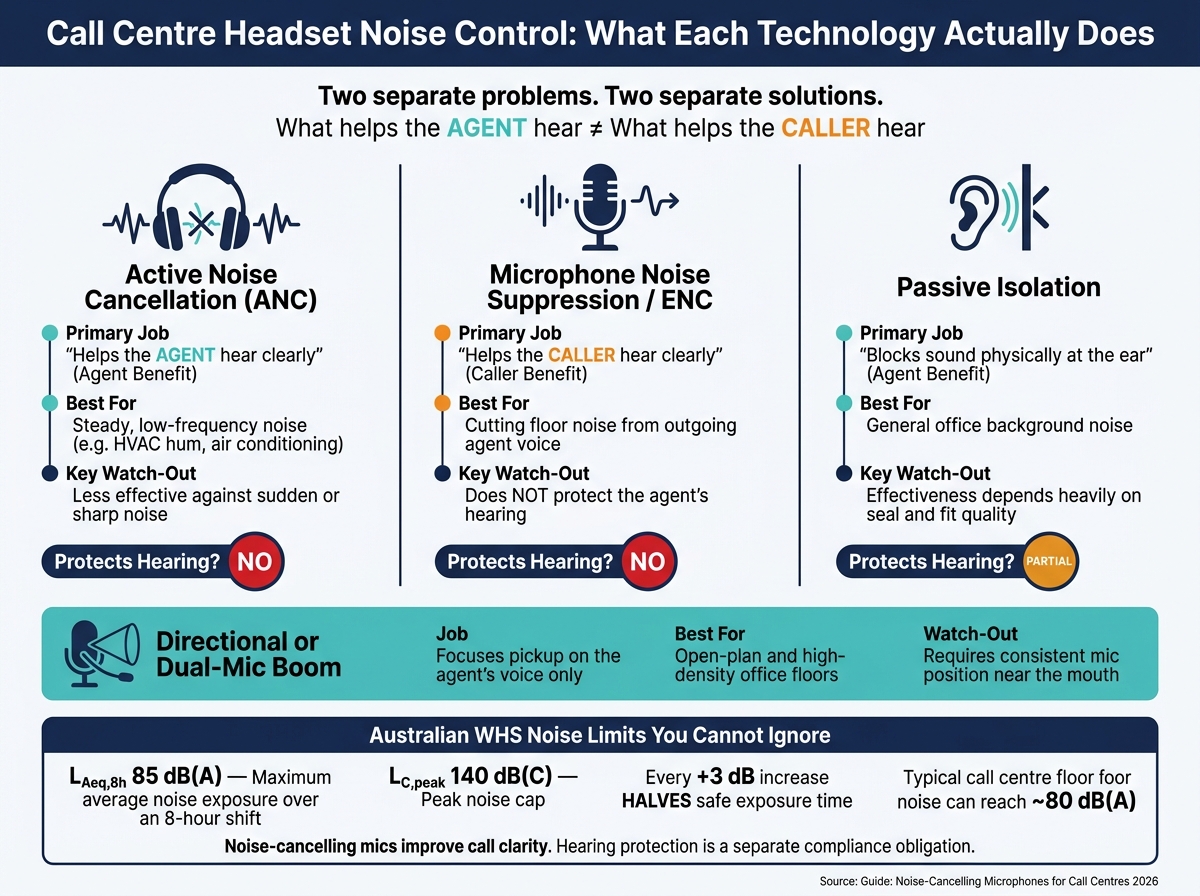
Call Centre Headset Noise Control: ANC vs Mic Suppression vs Passive Isolation
Top 4 Wired Call Center Headsets in 2024! (Microphone Test)
sbb-itb-80b2a19
Quick comparison
| Item | Main job | Best for | Main watch-out |
|---|---|---|---|
| ANC | Helps the agent hear | Steady low sound | Less effect on sudden or sharp noise |
| Passive isolation | Blocks sound at the ear | General office noise | Depends on seal and fit |
| Mic noise suppression / ENC | Helps the caller hear | Floor noise in outgoing audio | Does not protect hearing |
| Directional or dual-mic boom | Focuses on the agent’s voice | Open-plan and high-density floors | Needs steady mic position |
This article covers the key differences, the headset types worth shortlisting, how I’d test them during peak noise, and the WHS points Australian contact centres cannot ignore.
Microphone Types and Headset Designs
Call-centre microphone formats compared
Now that the noise issue is clear, the next step is picking a headset design that gives the best speech pickup. It helps to separate what the caller hears from what the agent feels wearing the headset. They’re linked, but they’re not the same thing.
A boom mic that sits close to the mouth is the starting point for clear speech. In louder offices, some headsets also use more than one microphone to help with voice pickup.
| Design element | Primary effect | Key point |
|---|---|---|
| Boom microphone | Speech clarity | Best when positioned consistently near the mouth |
| Multiple microphones | Speech clarity | Used in more advanced headset designs to assist pickup |
| Active Noise Cancellation (ANC) | What the wearer hears | Reduces background noise electronically |
| Passive isolation | What the wearer hears | Blocks sound with physical materials |
Once you’ve narrowed down the format, the main thing is consistency. A headset can have a good mic on paper, but if it doesn’t stay in the same spot near the mouth, speech quality can drop.
Design features that improve speech pickup
Boom position is one of the biggest drivers of speech clarity. If the mic sits too far from the mouth, it will catch more room noise. So placement matters just as much as the mic itself.
Sidetone also plays a part. It lets agents hear a bit of their own voice in the headset, which can stop them from speaking too loudly or turning the volume up too far.
From there, the focus shifts to three day-to-day factors: boom position, sidetone, and fit. Those details often shape how well a headset works across a full shift.
How to Choose the Right Microphone for Your Contact Centre
Matching microphone features to different call-centre setups
No single headset fits every contact centre. The right pick comes down to the noise around the agent and how they work day to day.
Once fit and boom position are sorted, the next step is to match the headset to the setting it will be used in.
| Environment | Key priority | What to look for |
|---|---|---|
| Quiet desk / home office | Clear speech capture | Clear mic capture and all-day comfort |
| Open-plan office | Background speech rejection | ENC, directional boom mic, and stable fit |
| High-density office floor | Stable speech pickup | Directional mic and secure boom position |
| Hot-desking / shared workstations | Hygiene and durability | Easy-clean materials and replaceable parts |
| Hybrid or home-based agents | Simple deployment | USB or 3.5 mm connectivity |
| Long-shift users | Comfort and consistency | All-day wear comfort and a reliable fit |
If you're setting up shared workstations, put easy-clean materials and replaceable parts near the top of the list. It saves hassle and helps headsets last longer.
Compatibility, deployment and budget planning
Before rollout, check softphone compatibility, connection type, fit testing, and staff training. This part matters more than many teams expect. Poor fit can cut effectiveness by 50% or more, so even a good headset can fall flat if the rollout is sloppy.
Include fit checks and staff training in the total rollout cost. That gives you a more honest picture of what the change will take.
Once you have a shortlist, test each model in real call-centre noise before rollout. A headset that sounds fine in a quiet meeting room can be a different story on a busy floor.
How to Test Voice Quality Before a Full Rollout
A simple testing method for call-centre conditions
With your shortlist in hand, head out onto the floor during peak hours and find the loudest spots. Think areas near air conditioning units or busy walkways where people are constantly moving through. Use a sound level meter or a calibrated smartphone app to measure the noise during those busy periods. Then test at the highest noise level your floor actually hits.
After you’ve mapped those noisy areas, test each device in both quiet conditions and peak-floor conditions. Then compare two things: what the agent hears, and what the caller hears. That part matters. A headset can feel fine for the person wearing it and still sound poor to the customer. You’re looking for clear speech at both ends.
It’s also worth checking connection stability across a full shift, especially for wireless or Bluetooth models. On a busy floor, dropouts and interference can show up when you least want them to.
Bring agents into the testing process too. They’ll spot issues a spec sheet won’t tell you about, like pressure points, heat build-up, or comfort problems that only show up after hours on a call.
How to score and compare devices
Use the same scorecard for every device. That way, you’re judging each one on the same basis instead of making rough guesses.
Here’s a simple template for your pilot:
| Device Name | Connection Type | Noise Condition (dB) | Speech Clarity (1–5) | Background Noise Rejection | Comfort (8hr Shift) | Compatibility Issues |
|---|---|---|---|---|---|---|
| Device A | USB-C / Wireless | 75 dB (Peak) | 5 - Crystal Clear | Minimal/None | High - No pressure | No dropouts observed |
| Device B | USB-A | 82 dB (High) | 4 - Natural | Slight hum | Moderate - Warmth | Mute sync issues |
| Device C | Bluetooth | 70 dB (Normal) | 3 - Clipped | Aggressive gate | High - Lightweight | Occasional echo |
You should also add a couple of extra checks to the scorecard:
- Voice naturalness: Some headsets make the agent’s own voice sound hollow or boomy. That might seem minor at first, but over a long shift it can wear people down.
- Cleaning effort: If a headset is hard to clean, chances are it won’t be cleaned often enough.
Run the pilot across several agents and across different shift times before approving rollout.
Hearing Safety, Australian Requirements and Final Takeaways
Safe headset use and workplace noise obligations in Australia
Once you’ve tested voice quality, keep call clarity and hearing protection in separate buckets. A noise-cancelling microphone can help the person on the other end hear you better. It does not protect the person wearing the headset.
Under Australian workplace health and safety law, employers must keep noise exposure within LAeq,8h 85 dB(A) over an eight-hour shift, with a peak cap of LC,peak 140 dB(C). And here’s the part that catches people out: every 3 dB increase halves safe exposure time.
Acoustic shock is a known call-centre risk. That’s why headsets should have volume limiting and acoustic shock protection built in. If hearing protection is supplied to staff, it needs to be selected and maintained to AS/NZS 1269.3. Fit testing also matters. If the seal is poor, protection drops off fast.
If someone reports ringing ears or discomfort after a shift, don’t brush it off as “just one of those things”. Treat it as a reportable incident. Put a clear process in place so staff can flag symptoms early, and run baseline audiograms so you have a reference point for tracking hearing health over time.
When custom communication and hearing-protection solutions may apply
Sometimes standard headsets just don’t hold a proper seal or stay comfortable through long shifts. When that happens, custom-fit options can make sense.
For high-noise floors or long shifts, ACS Custom offers custom-moulded communication devices and hearing protection for a more consistent seal and better all-day comfort.
Priorities for 2026
Pick the microphone format that suits your space. Meet hearing-safety duties as a separate compliance task. Then focus on fit, comfort and consistency.
That mix is what helps protect call quality and your team across every shift.
FAQs
Do I need ANC or mic noise suppression?
It depends on your call centre setup. ANC uses microphones to pick up background noise and then creates an opposing sound wave to cut it down. In a busy office, that can reduce distractions and make conversations easier to follow.
If your workspace has steady background noise, ANC can help you stay focused and keep your voice clear. That said, there’s a trade-off. Too much noise blocking can make it harder to hear important instructions or safety alerts.
How loud is too loud for a call centre?
In Australia, workplace noise is too loud at 85 dB(A) averaged across an eight-hour shift.
Here’s a simple way to judge it on the spot: if you have to raise your voice so someone an arm’s length away can hear you, the noise level is likely 85 dB(A) or more.
If hearing protection is worn, the goal is to bring the noise reaching the ear down to 75–80 dB(A). Going below 70 dB(A) isn’t the target, because workers still need to hear alarms and spoken instructions.
What should I test before rollout?
Before rollout, test noise levels and make sure your control measures are cutting exposure. Use calibrated sound level meters or dosimeters so you’re working from solid data, not guesswork.
Then carry out fit testing. Hearing protection has to suit both the job and the person wearing it. On paper, a product can look fine. In practice, its performance comes down to fit and whether people wear it the right way, every time.
You should also:
- include baseline and follow-up audiometric testing
- keep records for audits
- check communication clarity through staff feedback on comfort, alarm audibility, and how well instructions are heard
That last point matters more than people sometimes think. If workers can’t hear alarms properly, or spoken instructions get muffled, the gear may create a new safety issue while trying to fix another one.


